Recorder Classroom Accounts
Creating An Online Account
All Recorder Classroom subscribers have access to many extra downloadable files for each issue. But you must have an online account in order to access these online extras.
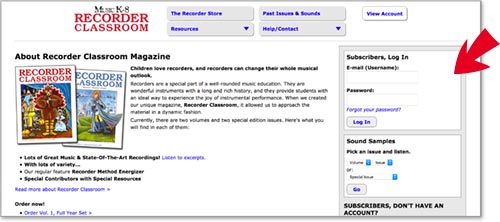
If you ordered a Downloadable Subscription (or a combination subscription), you already have an online account. Your username is the billing e-mail address you used to purchase the subscription. Your password was sent to that address. (You will be asked to change your password the first time you log in.) If you lost your password, you can reset it on this page. If the billing e-mail address belongs to someone else (for example, if the school secretary purchased the subscription for you), have that person forward you the e-mail with the password. You can then log in and change the username to your own e-mail address.
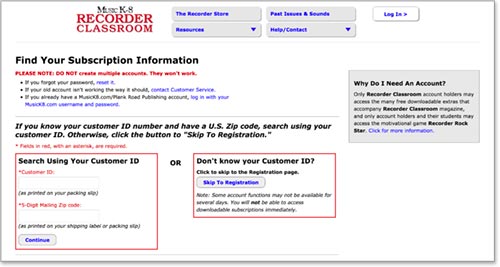
If you have a print-only subscription, you can create an account here manually. You will be asked to select a username (your e-mail address) and password. Once your account request has been processed, you will have full privileges to access all the free downloads for Recorder Classroom magazine.
Once you have your account information, you can log in on the RecorderClassroom.com Home Page, or by clicking the "Log In" link at the top of any RecorderClassroom.com web page.
Finding Downloadable Extras
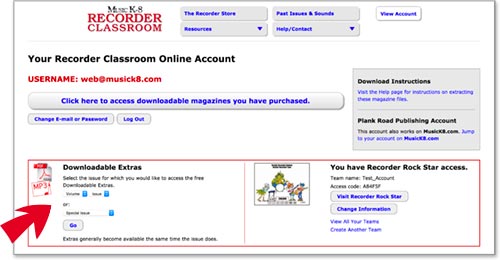
Each issue of Recorder Classroom has many useful teaching extras available online. Once you are logged in to your account, you can use the search menu to find all downloads for any issue that you own.
Recorder Rock Star
RecorderRockStar.com has been phased out, because it is Flash based, and Flash is no longer supported.
How A Downloadable Subscription Works
Ordering A Downloadable Subscription Online
Purchase a Downloadable Subscription on RecorderClassroom.com or MusicK8.com.
When you check out:
- a RecorderClassroom.com account is automatically created for you, using your billing e-mail address as the username.
- an e-mail is sent to your billing e-mail address. It includes your temporary password, plus instructions on how to log in.
Ordering A Downloadable Subscription By Phone, Fax, or Mail
Purchase a Downloadable Subscription as you would a standard print subscription, BUT BE SURE TO INCLUDE A VALID E-MAIL ADDRESS. You won't be able to access your downloadable magazine files unless the address is valid.
When payment is received, we will create an account for you on RecorderClassroom.com, and we will send you an e-mail containing your temporary password and instructions on how to log in.
Logging In And Downloading Your Files
Log in on RecorderClassroom.com. For added security, the first time you log in, you need to change your password. Choose a password that is easy to remember and contains at least eight (8) characters (both letters and numbers). Passwords are case sensitive; your username is not. Once you are logged in, the volumes of Recorder Classroom which you are subscribed to will be displayed.
When an issue becomes available:
- a link will be added to your account area. You can then download a compressed file of the magazine and audio files by clicking on the link. Depending on the size, you may need to download two or more compressed files to get the whole downloadable magazine.
- an e-mail will be sent to the e-mail address you are using as a username, alerting you when the magazine is ready to download. BE SURE TO KEEP YOUR E-MAIL ADDRESS INFORMATION UP-TO-DATE SO YOU KNOW WHEN YOU CAN DOWNLOAD YOUR MAGAZINE! You can update your e-mail address or change your password by clicking the Change E-mail or Password button on your Account page.
Once your files are downloaded, extract them. Most computers have built in software to do this. (See below.) You should find one PDF containing the printable pages of the magazine and several MP3s.
Restrictions
Rights to use downloadable materials belong to the purchaser only. All Plank Road Publishing materials are covered by our copyright policy. It is against the law to post these files on web sites or share them electronically.
You may download your files a maximum of three (3) times. Thus, if the file didn't download fully, or if your computer crashed and you lost the files before you could make a backup, you can go back to your account and download the files again. After the third time, you will not be able to download your files again. (If there are extenuating circumstances, contact us.)
Extracting Your Files
To use the files, you'll need to expand or unzip the compressed files.
Windows XP and later users have built-in software: Simply double-click the zipped file, then choose the Extract All Files option under Folder tasks on the left-hand side of the window. An Extraction Wizard may open to lead you through the process.
Mac OSX users also have built-in software: Simply double-click the zipped file to unzip it.
You can also download extraction software, if you prefer. Simply search for "zip extractor" in your favorite search engine, and you'll find several free options.
Enabling Cookies
Recorder Classroom utilizes cookies for your account and your online shopping cart. Please ensure that cookies are enabled in your browser prior to browsing our site.